Magic Marker
A motion-captured wand that turns the stage into a live-editable digital chalkboard.
What it is
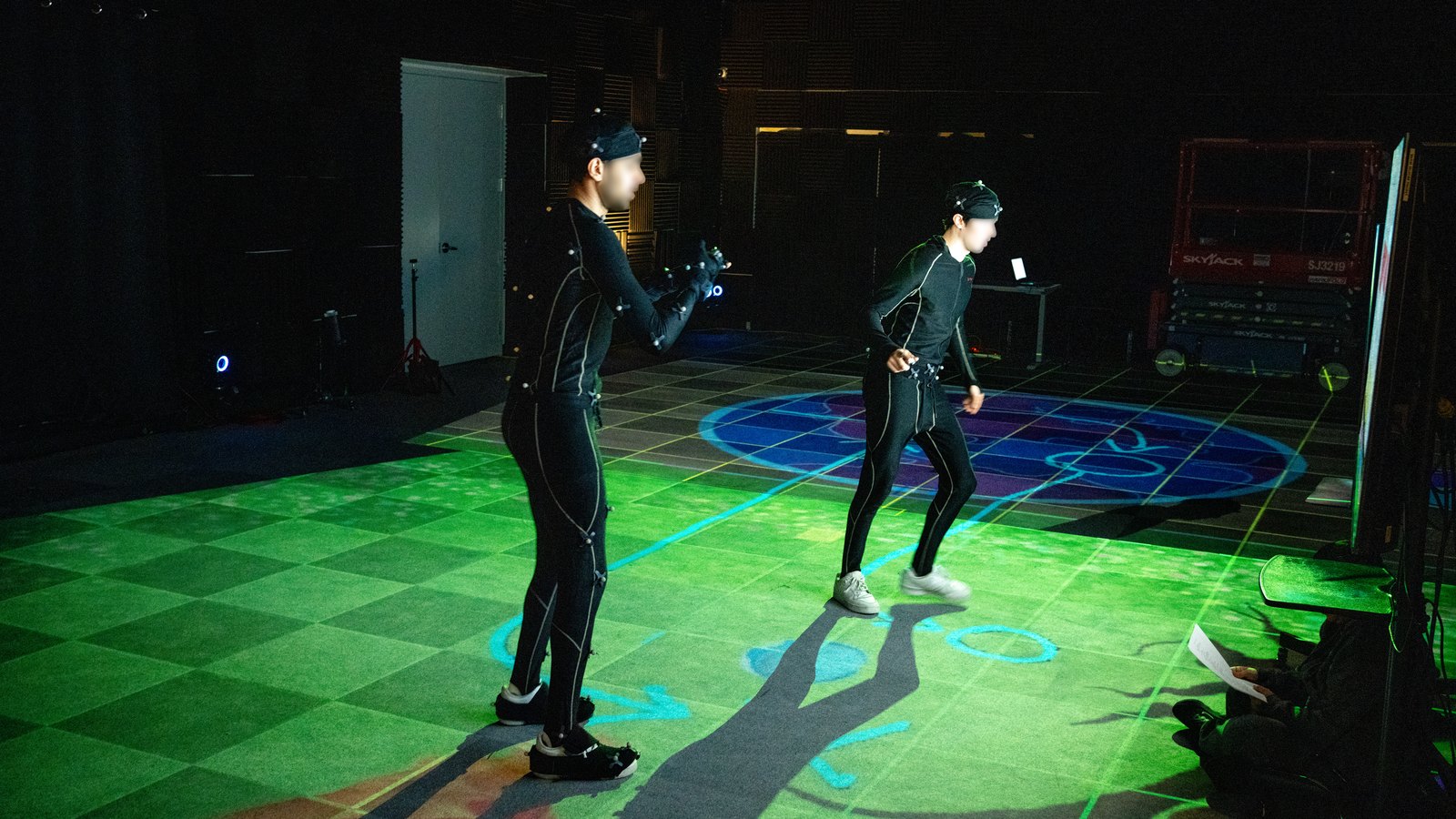
A real-time spatial cueing tool for Unreal Engine. A motion-captured wand lets a director draw and erase floor cues on the fly during a shoot, and the cues appear identically on every display the production uses: the performers’ VR headsets, their AR glasses, and the projection-mapped stage floor.
Started as Personal R&D and now shipped at Versatile Media as Realtime Supervisor (2025), with a 12-performer validation study at Simon Fraser University as part of my MSc thesis. Directors who try it once tend to keep using it, because the alternative (stopping a take to peel and re-lay tape) starts to feel slow by comparison.
In short: tape on the floor, but adjustable in real time, visible everywhere the digital scene is, and built specifically for the modern MoCap stage.
Why it matters
On a typical multi-environment shoot, production tapes the floor for every environment until performers have to mentally filter a dense web of overlapping tape every take. Magic Marker replaces tape with digital cues that swap with the scene, leaving the floor clean and letting the director adjust blocking live.
The tape problem in detail
In a typical multi-environment shoot, the production team ends up taping the floor for every environment in different colors. One color for the alley, another for the rooftop, another for the interior, and so on. By the third environment, the floor is a dense web of overlapping tape that a performer has to mentally filter every take. Resetting blocking means peeling tape, re-marking, and starting over.
Magic Marker replaces all of that. The cues live with the digital environment, so the floor is clean except for the marks that matter for the current scene. The director draws and erases live during a take, with no production stoppage. And because the cues exist in the same Unreal Engine source feeding every display on stage, performers in any modality see exactly the same blocking the director just drew.
How it works in practice
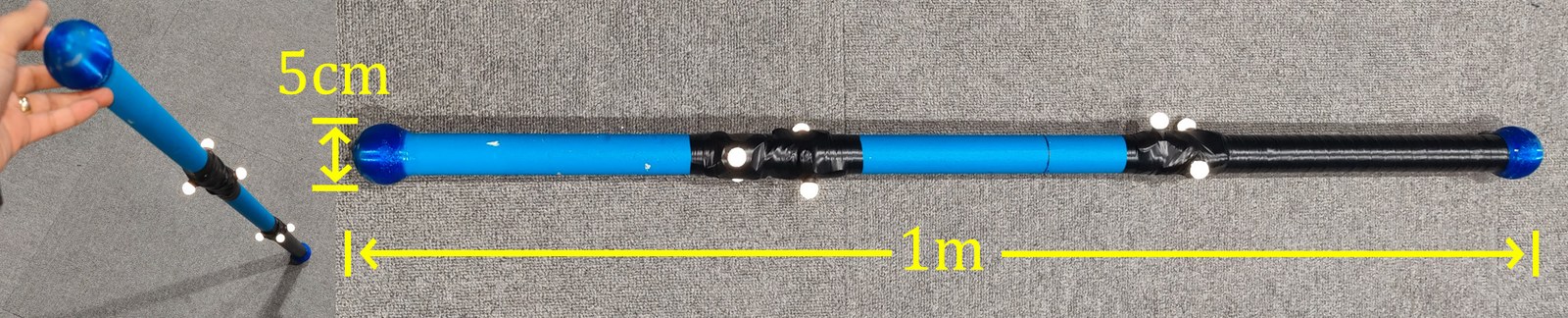
The physical Magic Marker is a one-meter wooden rod with reflective MoCap markers and color-coded TPU tips: light blue draws, black erases. Cues render at a standardized 5 cm scale matching the physical tip, so what the director draws on the floor feels physically continuous with what performers see across all three display modalities.
Full design detail (wand specs, cue visual language, waypoint shapes)
The physical Magic Marker is a one-meter wooden rod fitted with seven passive reflective markers, tracked as a rigid body by the optical MoCap system. Both ends carry custom 3D-printed tips made from flexible TPU, each about 5 cm across, so the wand glides over the carpeted capture area without catching, dragging, or producing inconsistent contact points.
The two tips are color-coded for fast use during a live take. The light blue end draws cues; the black end erases them. A director can switch instantly between adding and removing marks without breaking the performance flow or stopping to reach for a different tool.
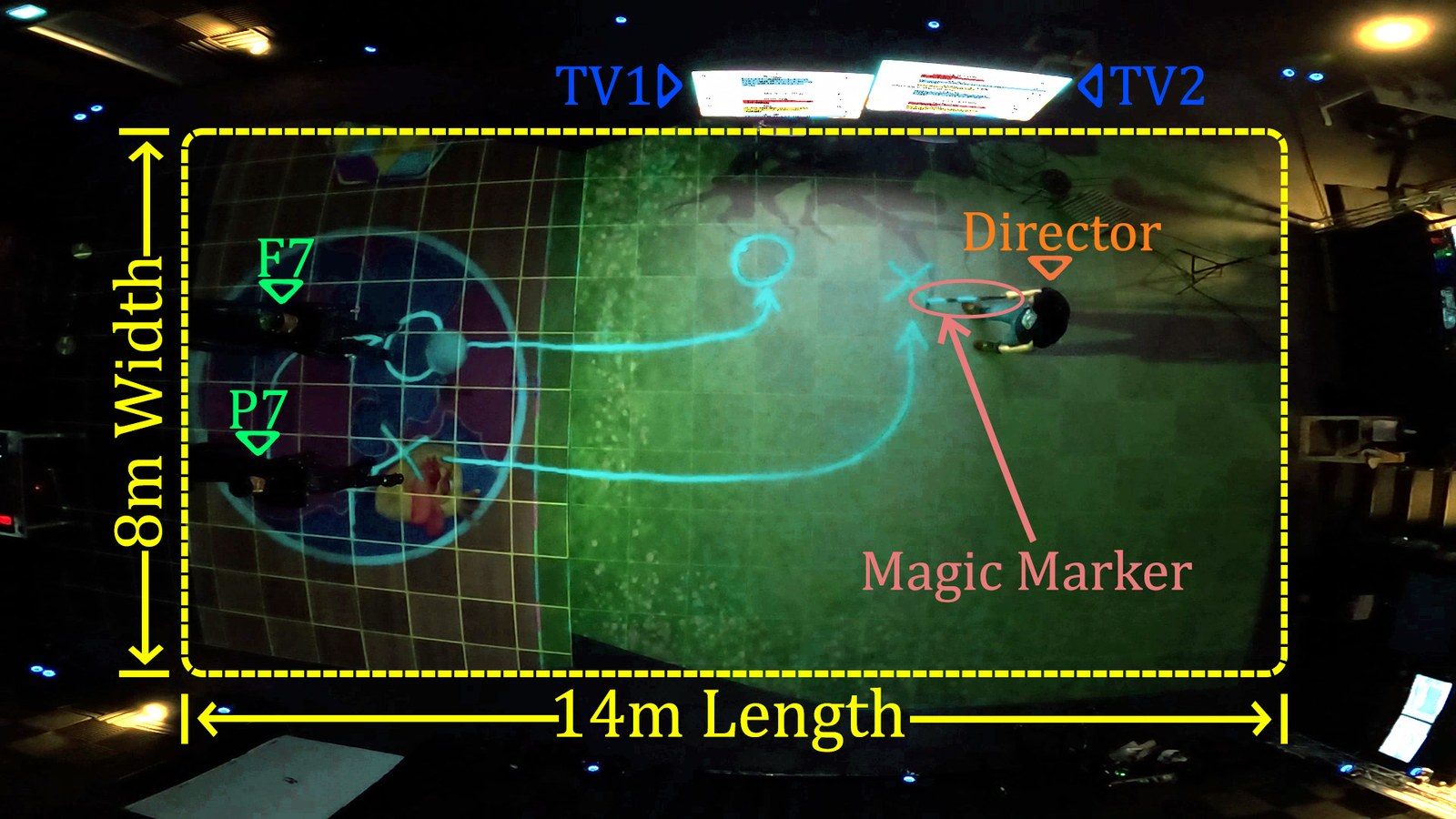
The digital cues themselves follow a deliberate visual language. All marks render at a standardized 5 cm scale matching the physical tip, so what the director draws on the floor feels physically continuous with what performers see. Path strokes are 5 cm wide, waypoints are 5 cm in diameter, and the cues use high-contrast colors so they remain readable both inside HMDs and when projected against the real stage floor.
Different character roles get different waypoint shapes. In the SFU study scene, circular markers represented Frittata’s positions and cross-shaped markers represented Potato’s. Multiple performers can reference a single shared layout without confusion, each tracking their own movement targets by shape rather than mentally filtering a generic mark.
Multiple display modalities
Magic Marker doesn’t require the floor — the core mechanic (track a rigid body, deposit strokes where its tip meets a digital surface) generalizes to any surface in any orientation. Three strategies in production: floor → projection mapping; fixed surface (a cork board, a wall) → a real display at that world-space coordinate; anywhere → VR or AR headset. Used all three on real shoots.
Video walkthrough coming soon — to be embedded once uploaded to YouTube.
The three display strategies in detail (with the hacker server-room cork-board scene)
- Floor surface → projection mapping. The floor is its own display; cues land where they’re drawn. This is the original Magic Marker setup.
- Fixed surface in known world-space coordinates → a real display placed at that location. Drop a TV or monitor on stage at the exact position where the virtual surface (a cork board, a chalkboard, a poster) lives in the scene. The performer sees their strokes appear on the TV as they “draw on the wall” in front of them.
- Anywhere, any orientation → VR or AR headset. The performer wears an HMD and sees the strokes in-scene, no physical display needed.
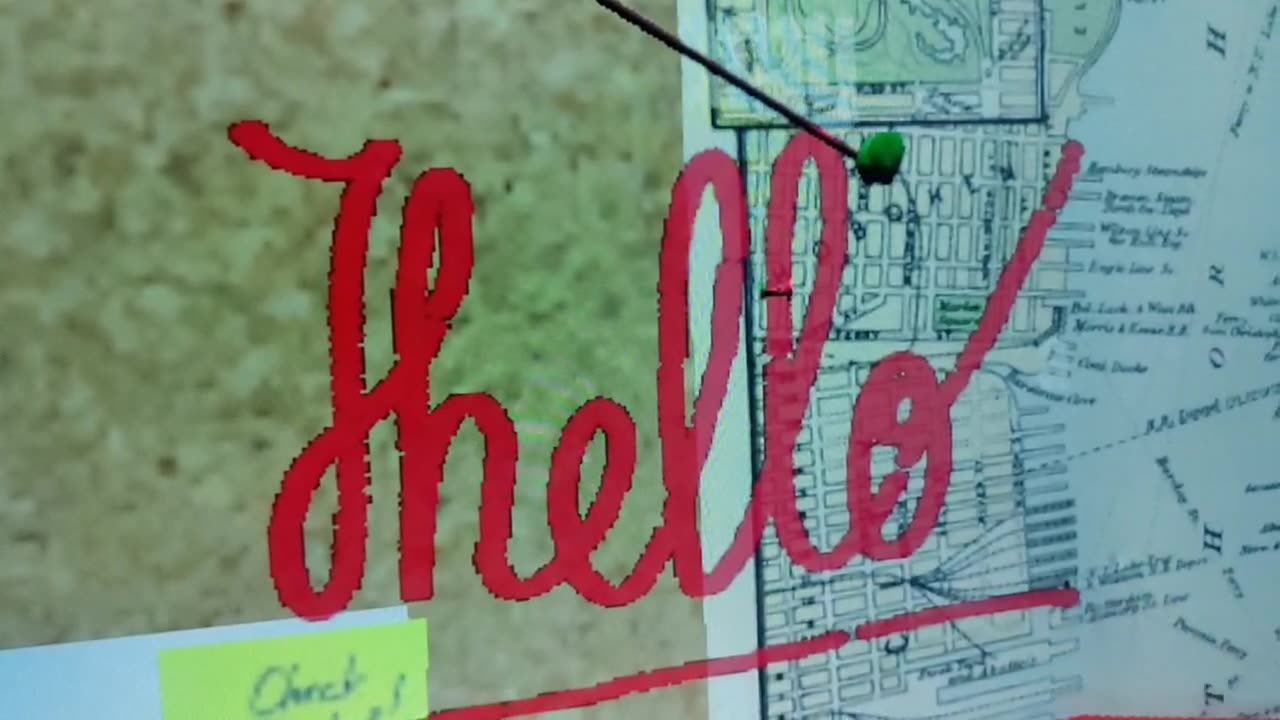
The middle strategy powered a server-room scene we shot at Versatile. The virtual set was a hacker’s office with an investigation cork board on the wall — old city map, pinned evidence, sticky notes, red string between pushpins. We placed a TV on the stage at the cork board’s world-space coordinates and used a variant of the Magic Marker — a smaller handheld tracked pen with a four-marker MoCap crown on the back — to capture a scripted dramatic beat where the actor draws a circle around the next victim’s photo. The strokes appeared live on the TV as the actor drew, and the take was captured on camera as part of the scene.
Tested across VR, AR, and projection mapping
Magic Marker is in active production use at Versatile Media across every shoot that needs floor cueing. To validate the design beyond the studio, I also ran it through a controlled 12-performer study at Versatile Media as part of my MSc thesis at Simon Fraser University: the same scene, the same blocking, all three display conditions. Across every condition, participants described the cues as a stabilizing aid for blocking and collision avoidance. One performer summed it up as “so incredibly helpful.”
Study findings by modality (VR, AR, projection mapping)
In VR, where performers can’t see the physical floor at all, Magic Marker became their primary anchor. Participants used the floor cues as “stabilizing anchors for physical orientation” (P5, P6, F2, P7), letting them stay grounded and avoid collisions while the rest of their attention stayed inside the virtual scene.
In AR, where performers see both the physical room and the digital overlay, Magic Marker integrated cleanly with their dual awareness. Performers adjusted movement based on real-time perception while following the floor cues for positions and walking paths, supporting moment-to-moment corrections without breaking the scene.
In projection mapping, where there are no headsets and the digital world lives only on the stage floor, Magic Marker provided the only consistent navigational reference. Floor-based guidance let performers maintain accurate movement without having to memorize blocking.
Academically, Magic Marker is positioned in my thesis as an example of a “spatial grounding” mechanism: a stabilizing layer that supports immersive engagement without breaking it. Across the three modalities tested, the consistent finding was that grounding doesn’t compete with immersion. It enables it, by removing the cognitive overhead of tracking where you are physically while you act in a virtual world.
Hardware architecture
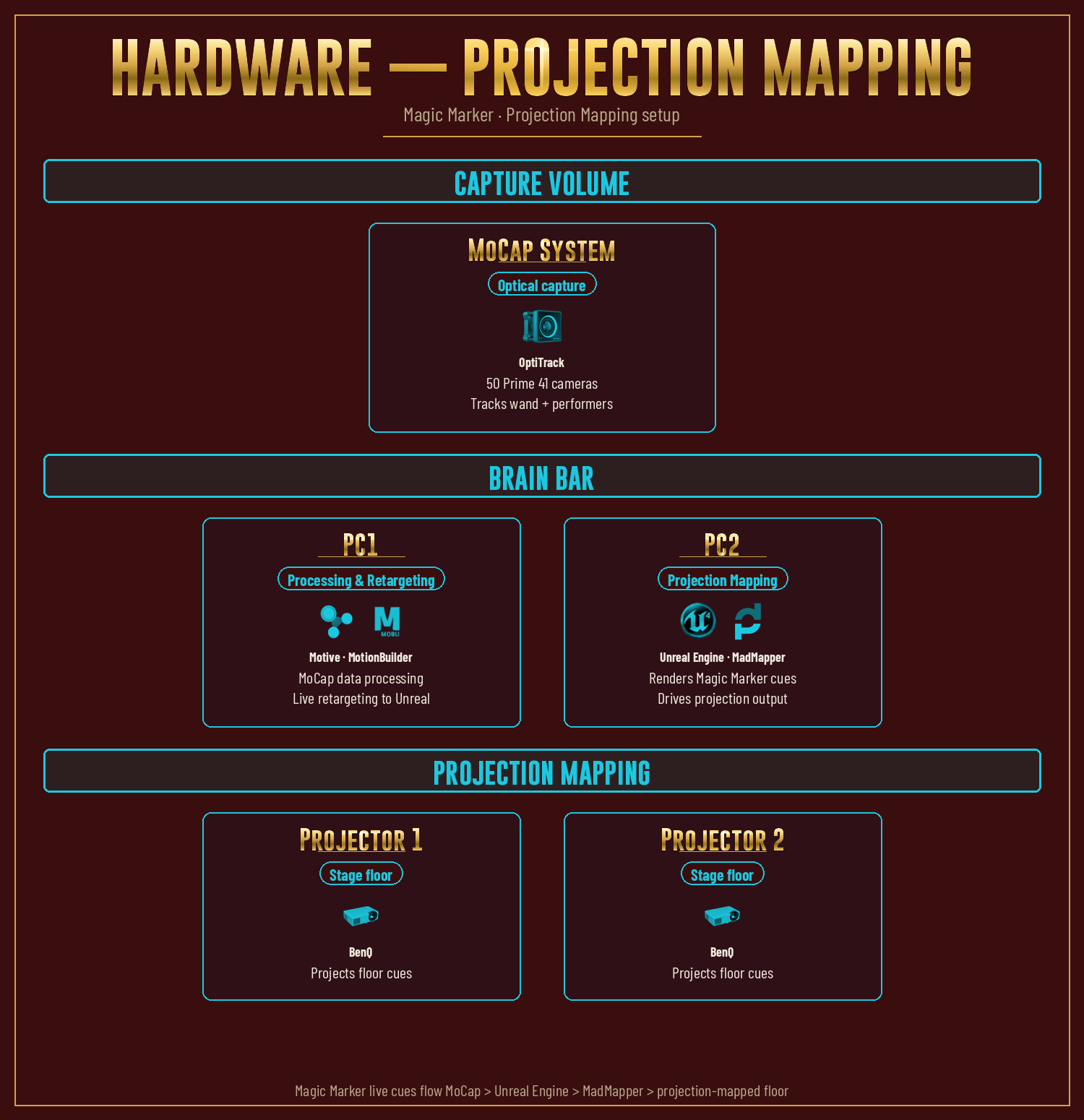
The projection-mapping variant of Magic Marker runs on a small dedicated hardware stack: an OptiTrack volume captures the wand and performers, one PC handles MoCap processing and live retargeting, and a second PC renders the cue layer in Unreal Engine and feeds it through MadMapper out to the BenQ projectors that light up the stage floor.
Technical implementation deep dive (full multi-modality architecture)
Magic Marker is built into the same Unreal Engine project that drives the rest of the virtual production pipeline. The wand is registered as a rigid body in the optical MoCap system; that tracking data streams into Unreal alongside the performers’ MoCap, where the wand’s tip position is sampled in real time and used to spawn or remove cue geometry directly on the floor surface.
The cross-modality consistency comes from a distributed multi-PC architecture. A capture-and-control workstation owns the MoCap retargeting and Magic Marker data. Three render workstations subscribe to that data over the network and produce the appropriate output for each display modality: one for VR headsets (Meta Quest 2 over Air Link), one for AR overlays (HoloLens 2 over Holographic Remoting), and one for the projection-mapped floor (BenQ projectors driven through MadMapper).
Because every display is rendering from the same upstream source, the cue a director draws appears in identical real-world coordinates everywhere at once: same shape, same size, same position. There’s no per-display authoring step, no manual sync, and no risk of drift between what one performer sees in VR and what the projection is showing the room.
Origins: VRSketchGAN
Magic Marker grew out of an earlier research project of mine called VRSketchGAN (December 2022), where I built a VR painting tool in Unreal that authored semantic-segmentation maps for NVIDIA’s GauGAN to turn into photoreal landscapes. The core mechanic — a tracked physical implement, in contact with a digital surface, depositing a labeled stroke — is identical. Magic Marker is that same primitive scaled into a production-stage tool, where the canvas is the MoCap floor and the strokes are blocking cues for performers.
The full VRSketchGAN story
VRSketchGAN dropped the user onto the rooftop deck of a luxury yacht floating on an open ocean, with a flat canvas mounted on the deck and a wooden palette beside it. The palette wasn’t loaded with paint colors. It was loaded with semantic categories. Each dollop was labeled (sky, sea, mountain, river, sand, road, tree, grass, stone, bridge, house, and so on). The brush picked up whichever class it touched, and the next stroke deposited that class onto the canvas. The result was a paintable, 3D-spatial way of authoring a GauGAN segmentation map.
The bridge between Unreal and GauGAN was a small Python script that drove the public GauGAN2 web demo via Selenium and ChromeDriver. Unreal flattened the canvas into a 2D segmentation map; the script puppeted the web page to upload the segmap and trigger a render; the photoreal output was saved; and Unreal pulled it back in as a texture in the same VR scene. Paint a stroke, regenerate, see the photoreal interpretation in your headset, keep going. Closed-loop iteration without leaving VR.
Magic Marker is the evolution of that brush-on-canvas primitive into a production-stage tool. The mechanic is the same: a tracked physical implement, in contact with a digital surface, depositing a labeled stroke. What changed is the production context. VRSketchGAN’s surface was a virtual canvas, and the strokes were semantic regions for a GAN to render. Magic Marker’s surface is the physical MoCap stage floor lit by the studio’s projection-mapping system, and the strokes are blocking cues for performers. Different stakes, identical mechanic.
From personal R&D to studio adoption
I built the core (tracked wand, stroke-on-surface deposition, erase, multi-modality output) on my own time as a follow-on to VRSketchGAN, then brought it to Versatile Media and they let me keep developing it inside the studio’s pipeline. The big studio-era addition is per-location texture state — each scene saves its own cue layer that swaps in as the production moves between locations.
The full personal-R&D-to-studio-adoption story
I started developing Magic Marker on my own time as a follow-on research project to VRSketchGAN. The thing I wanted to demonstrate was simple to state: you draw on the floor with a stick, and the floor remembers. It sounds modest until you actually watch someone use it, then the implications for performance capture become obvious within minutes.
I built the core functionality on my own — a tracked wand, stroke-on-surface deposition, erase, multi-modality output — and got it to a working state outside any production context. Then I brought it to Versatile Media and demoed it. They saw it once, and they let me keep developing it inside the studio’s pipeline.
That’s where the studio-era additions came in. The big one is per-location texture state: each scene/location gets its own saved set of cues, and the system swaps the cue layer in and out as the production moves between locations during a shoot day. A director doesn’t have to redraw blocking every time the scene changes. They step into the new location and the cues they drew last time are already there, ready to edit.
Versatile’s stage, projection-mapping infrastructure, and active production cycle are what let the tool grow up. Real shoots, real directors, real performers, and the kind of edge-case stress testing you only get from running a tool through actual production back-to-back.
In production today
Magic Marker is now a standard part of how the studio runs virtual production sessions, used across the full range of shoot scales — from short performance-capture validation sessions to multi-day full-production shoots on LED volumes and projection-mapped stages.
Future development is focused on scaling the tool to more complex scenes — more characters on stage at once, longer cue paths, multiple concurrent cue layers — and on testing how Magic Marker holds up over longer rehearsal cycles and repeated takes. The goal is to keep the cues helpful as production complexity grows, without letting them become visual clutter on stage.